Soracom Funnel is an adapter service that transfers data from a device directly to a specified cloud service. Funnel allows you to offload encryption workloads to the cloud and integrate devices that have protocol limitations.
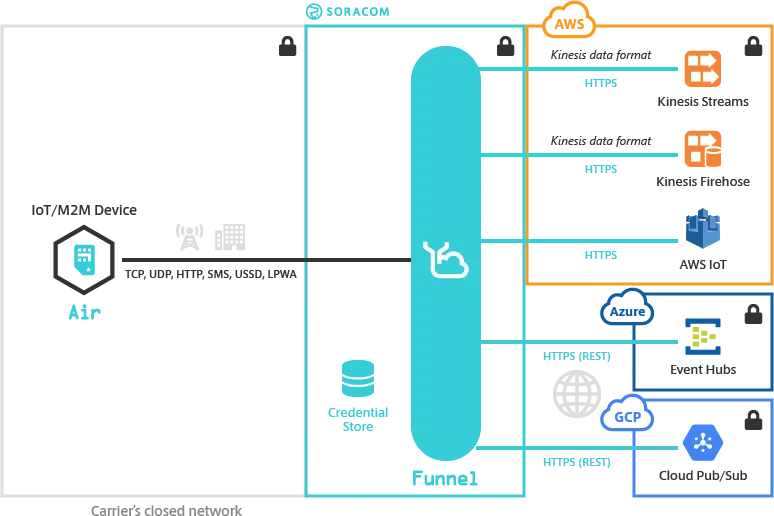
Much like Soracom Beam, data sent from a device to the Soracom platform is secured through closed carrier networks and dedicated private lines to Soracom, allowing you to utilize lightweight protocols between your device and Soracom. In turn, Funnel performs encryption on the cloud, and takes care of sending your data directly to a cloud service.
Compared to Beam
Simpler Setup
While Beam and Funnel both provide similar functionality in receiving data from your device and sending it to a specified endpoint, Beam is more general purpose and allows you to mix and match various incoming and outgoing protocols, as well as specify endpoints other than cloud services such as your application server. While Beam provides flexibility with extended protocol and endpoint support, it also requires additional configuration, even when using it with cloud services.
On the other hand, Funnel provides a greatly simplified configuration for applications that leverage cloud services. Funnel takes care of most of the forwarding protocol configuration required for certain cloud services, allowing you to simply specify only the forwarding destination and credentials in order to start sending data.
Asynchronous Design
Funnel prioritizes scalability, so it handles device requests asynchronously. Data is buffered in Soracom's backend and then forwarded to the designated service without sending a direct response to the device. As a result, the device cannot immediately determine whether the data was processed successfully.
If you require immediate confirmation of data processing or need the device to retry sending data, Beam is a better option.
Because Funnel processes data asynchronously, the following can occur:
- Delivery order is not guaranteed. For example, if two requests are sent to Funnel in quick succession, the second request may arrive at the destination before the first.
- The same data may be delivered more than once. Funnel guarantees at-least-once delivery.
To process data consistently on the destination side, include a timestamp and a unique identifier in your payload.
Available Adapters
Currently, Funnel is compatible with the following cloud services:
- Amazon Kinesis Data Streams
- Amazon Data Firehose
- AWS IoT
- Microsoft Azure Event Hubs
- Google Cloud Pub/Sub
Entry Points
To utilize Funnel, your devices must be compatible with at least one of the following entry point protocols:
Air for Cellular
| Entry Point | Address | Description |
|---|---|---|
| TCP | tcp://funnel.soracom.io:23080 | Receive TCP packets from a device and forward them to your cloud service |
| UDP | udp://funnel.soracom.io:23080 | Receive UDP packets from a device and forward them to your cloud service |
| HTTP | http://funnel.soracom.io | Receive HTTP requests from a device and forward them to your cloud service |
| SMS | 901021 | Receive SMS messages from a device and forward them to your cloud service |
| USSD | *901021*{data}# | Receive USSD messages from a device and forward them to your cloud service |
Currently, the SMS and USSD entry points are available only for plan01s, plan01s - LDV, and planX3 SIMs.
Air for Sigfox and Air for LoRaWAN
Data is captured automatically from the device. Configuring the device to send data to a specific entry point is not required.
Soracom Inventory
Data is captured automatically from the device. Configuring the device to send data to a specific entry point is not required.
Data Format
When Funnel captures data from your device, it will put it in a JSON object containing additional information about the device and forwarding request, with the following format. This JSON is then sent to your cloud service.
{
  "credentialsId": "<YOUR-CREDENTIAL-SET-ID>",
  "operatorId": "OP0012345678",
  "destination": {
    "provider": "aws"|"azure"|"google",
    "service": "aws-iot"|"kinesis"|"firehose"|"eventhubs"|"pubsub",
    "resourceUrl": "<YOUR-CLOUD-SERVICE-URL>",
    "payloadsOnly": true|false,
    "sendPayloadsAsBinary": true|false
  },
  "sourceProtocol": "tcp"|"udp"|"http"|"sms"|"ussd"|"sigfox"|"lora"|"inventory",
  "payloads": "<DEVICE-DATA>",
  "timestamp": 1653891795421,
  "imsi": "295000012345678",
  "imei": "350000012345678"
}timestampis the time when Funnel processed the data, in UNIX time (milliseconds).imsiandimeiare included for data sent from an IoT SIM. For data from Sigfox, LoRaWAN, and Inventory devices,deviceIdis included instead.- When Add SIM ID is enabled, the SIM ID is added as
simId. destinationcontains the destination settings of the group, such aspayloadsOnly(all destination services),sendPayloadsAsBinary(AWS IoT only), andrandomizePartitionKey(Amazon Kinesis Data Streams only), when they are set.
When Payloads Only is set to ON, Funnel sends only the value of payloads, without the other fields such as credentialsId, imsi, and timestamp.
For example, when Content type is JSON and Payloads Only is OFF, Funnel sends data like the following:
{
  "credentialsId": "my-aws-credentials",
  "operatorId": "OP0012345678",
  "destination": {
    "provider": "aws",
    "service": "aws-iot",
    "resourceUrl": "xxxxxxxxxxxxxx-ats.iot.ap-northeast-1.amazonaws.com/myTopic/#{imsi}",
    "payloadsOnly": false,
    "sendPayloadsAsBinary": false
  },
  "sourceProtocol": "http",
  "payloads": {
    "temp": 20.5,
    "humidity": 60
  },
  "timestamp": 1653891795421,
  "imsi": "295000012345678",
  "imei": "350000012345678"
}
When Payloads Only is ON, Funnel sends only the following:
{
  "temp": 20.5,
  "humidity": 60
}
The value of payloads depends on the selected Content type and, when Content type is (not specified), on the Funnel entry point used to send the data.
| Content type | Behavior |
|---|---|
(not specified) |
|
JSON | All entry points processed as JSON. |
Text | All entry points processed as plain text. |
Binary | All entry points processed as binary data.*2 |
Soracom Binary Format v1 | Binary data sent over TCP is processed as Soracom Binary Format v1 data before it is forwarded. For details, refer to Configuration. |
- When Content type is (not specified) and data is sent to Funnel through Unified Endpoint's HTTP entry point, Funnel processes the data as plain text regardless of the HTTP
Content-Typeheader. - When data is processed as binary data, Funnel forwards the data in JSON format, with the device data stored as a Base64-encoded string in
payloads. Even if the data sent to Funnel is formatted as JSON, it is processed as binary data when Binary is selected.
Limitations
SMS entry point - When sending data to Funnel using SMS, ensure that your device's SMS header option is disabled. If a header is included, the SMS User Data field will be processed as-is and will result in unwanted or malformed text content.
Maintenance
Sessions may be disconnected during system maintenance.
During Soracom maintenance, HTTP/MQTT/TCP/UDP sessions may be disconnected at any time. Note that session disconnections due to maintenance will not be announced on Soracom Status Dashboard.
Free Tier
Soracom provides a free tier for Funnel with each Soracom account. Refer to the Pricing & Fee Schedule for more information.