Starting September 1, 2026, a command execution fee will apply based on the number of requests made. There will still be a free tier available; each account will receive 100 free Remote Command requests per month. This allowance is shared across all SIMs in the account, not granted per SIM. Unused requests do not carry over to the following month.
Requests made on or before August 31, 2026 are free of charge. Refer to the Pricing & Fee Schedule for more information.
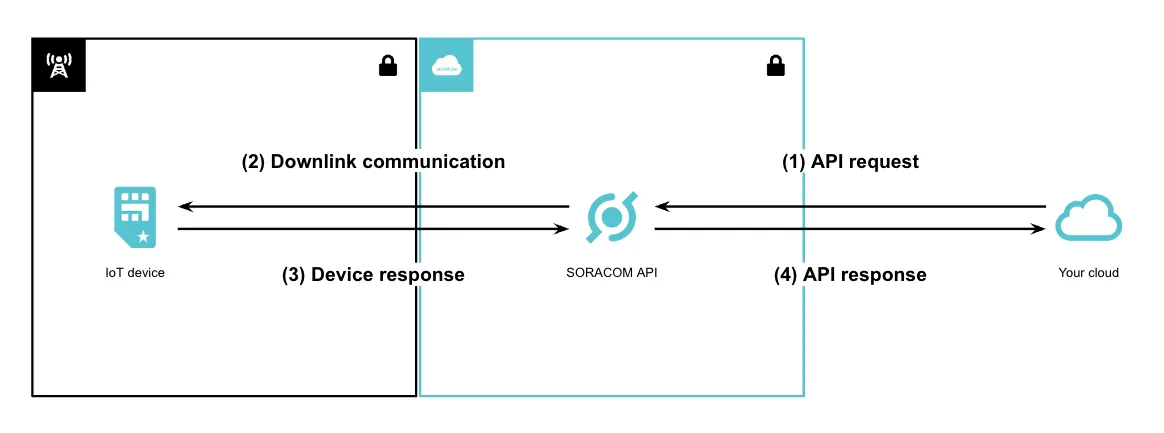
Remote Command enables downlink communications from the cloud to IoT devices.
Traditionally, cloud-to-device downlink communication has been challenging due to security concerns and network configuration complexities. Remote Command addresses these challenges by accepting SSH, HTTP, TCP, UDP or RTSP commands and associated data through the Soracom API, and securely transmitting the commands or data to devices via Soracom's secure private network. This architecture ensures a simple and secure communication channel.
With Remote Command, even legacy IoT devices can seamlessly integrate with the cloud as long as they accept communication over SSH, HTTP, TCP, UDP or RTSP. Furthermore, when combined with low-code development environments like Soracom Flux, it enables the creation of more sophisticated IoT systems, such as automatically sending commands to devices triggered by sensor data or cloud-based events.
Comparison with Other Features
Soracom offers multiple options for downlink communication. The table below compares Remote Command with other features:
| Service | Remote Command | Remote Device Access using Soracom Gate | ||
|---|---|---|---|---|
| Description | Sends commands or data to devices and receives execution results*1 | Sends data to devices | Provides on-demand remote access to devices | Allows continuous remote access to devices |
| Supported Protocols |
|
|
| Any |
| Max Data Size to Device |
| 140 B | Unlimited | Unlimited |
| Uplink Response to Downlink | HTTP, SSH, TCP, and RTSP (snapshot image) only | |||
| Connection Duration | Until the API call completes | Until the on-demand remote access session expires | Persistent |
- UDP only supports data transmission; RTSP only supports snapshot capture.
- Although UDP theoretically supports up to 65,507 B, practical limitations restrict it to approximately 1,400 B or less depending on the network path. Data exceeding this limit may be dropped.
Remote Command has a 10-second timeout. If the device does not respond in time, the API returns a 422 HTTP error.
Use Cases
Remote Command is intended for the following use cases:
| Use Case | Description |
|---|---|
| Initial Parameter Setting (Provisioning) | Set the necessary configuration for manufacturing and deployment (Wi-Fi settings, authentication credentials, sensor thresholds, etc.) for each device. |
| FOTA (Firmware Over-the-Air) Updates | Remotely trigger firmware updates on devices, apply security patches, and add new features. |
| ONVIF-Compatible Cameras | Use the ONVIF (Open Network Video Interface Forum) protocol to control pan-tilt-zoom (PTZ) operations on IP cameras. |
| Configuration Changes | Modify settings of devices such as PLCs (Programmable Logic Controllers). |
| Accessing Device REST APIs | Interact with REST APIs on IoT gateways to retrieve sensor data and control relays. |
| Industrial Equipment Control (e.g., Traffic Lights) | Remotely control traffic lights in factories and warehouses (on/off, blinking, etc.). |
| IoT Lock/Unlock | Remotely control electronic locks for remote access management. |
| Log Collection | Retrieve device operation logs and error logs for monitoring and analysis. |
| Accessing Other Devices on a Local Network | Use the target device as a gateway to access other connected devices in the local network. |
| Alive Monitoring | Periodically check the operational status of devices and trigger alerts upon detecting anomalies. |
| Send data to devices in low-power mode with eDRX | UDP is suitable for sending data remotely to devices even when they are in low-power mode. Refer to eDRX and PSM Timers. TCP can also be used for similar use cases, but the device must wake up and respond within a maximum of 300 seconds after the Remote Command is sent. |
Source IP Address
The source IP address for Remote Command varies depending on the connection type:
| Connection Type | Source IP Address |
|---|---|
| Soracom Air | 100.127.10.16 |
| Soracom Arc | 100.127.10.17 |
For Soracom Arc users, ensure that the WireGuard AllowedIPs configuration includes the source IP addresses above.