# Subscriber Status
Overview of SIM lifecycle statuses and capabilities.
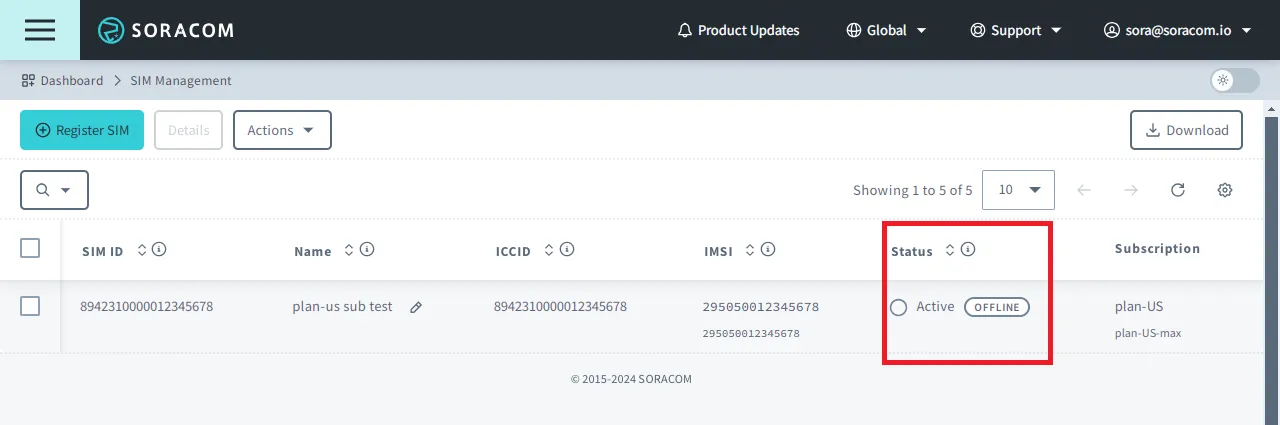
Each Soracom IoT SIM has a **Status** that indicates its subscription state. This status determines whether the SIM can communicate with the cellular network and which subscription fees may apply.
## Statuses
IoT SIM subscriptions move through several lifecycle states that control connectivity permissions and billing behavior.
### Subscriber Status vs. Session Status
An IoT SIM has both a **subscriber status** and a **session status**, which represent different aspects of its state.
- **Subscriber status** (Ready, Testing, Active, Inactive, Standby, Suspended, Terminated) controls the SIM’s subscription state, including connectivity permissions and billing behavior.
- **Session status** (Online or Offline) indicates whether the SIM currently has an active data connection.
These two states are independent. For example, a SIM in **Active** status may be Offline if the device is powered off or not connected, or Online if it has an active session. Because of this, a SIM in Active status may appear as either Active (Online) or Active (Offline) in the User Console, depending on the current session status.
For details on viewing session logs, checking when a SIM was last online, checking last location updates, and managing active sessions, see [Session Status](https://docs.soracom.io/en/services/air/session-status).
| Status | Summary | When to use |
| - | - | - |
| Ready | SIM is registered and ready for activation. | — \*1 |
| Testing | Temporary testing mode that allows limited communication without usage fees under predefined limits. | When verifying device operation within predefined usage limits before production deployment. |
| Active Offline | SIM is fully enabled and allowed to communicate. The device is not currently connected (no active data session).\*2 | When the SIM should be enabled and ready to communicate when the device connects. |
| Active Online | SIM is fully enabled and allowed to communicate. The device currently has an active data session. | When the device is actively communicating. |
| Inactive | SIM remains enabled but data sessions are blocked to prevent data usage. | When you need to temporarily stop data usage while keeping the SIM active. |
| Standby | SIM is disabled but can automatically reactivate when a device attempts to connect. | When a device will be unused for an extended period but should automatically reactivate when it attempts to connect. |
| Suspended | SIM is disabled and cannot connect until manually reactivated. | When a device will be unused for an extended period and must not automatically reactivate. |
| Terminated | SIM subscription is permanently cancelled and cannot be reactivated. | When the SIM is no longer needed and will not be reused. |
1. Ready is set automatically upon SIM registration.
2. Even if a device is powered on and registered to a network, it may not have established a data session, for example if the Access Point Name (APN) is not properly configured or if data roaming is disabled. Although the device may still be able to access SMS services, it will appear offline.
### IoT SIM Lifecycle
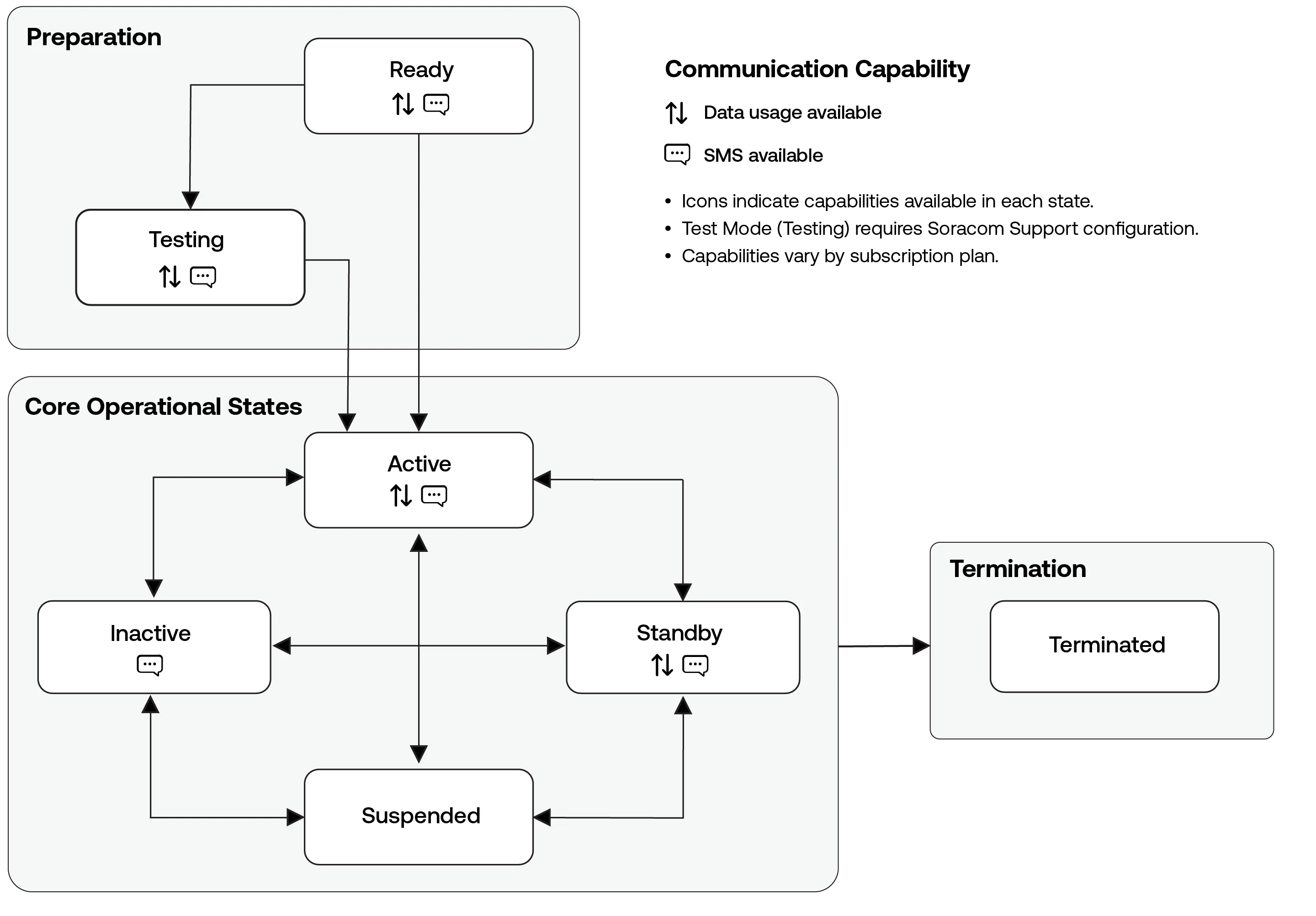
IoT SIM subscriptions move through several operational states during their lifetime. These states reflect common stages such as preparation, normal device operation, and eventual termination.
While multiple transitions are possible depending on how a subscription is managed, the lifecycle overview highlights the most common status relationships encountered during normal operation.
Status changes may occur automatically based on device behavior or manually through the User Console, Soracom API, or Soracom CLI.
> [!WARNING]
>
> While in **Standby** or **Suspended**, a SIM cannot maintain an active data or SMS session. In **Standby**, if a device attempts to communicate, the SIM automatically transitions to **Active**, and communication then occurs while in Active status. In **Suspended**, the SIM cannot connect until the subscription is manually reactivated.
### Capabilities and Fees
Each status affects both the communication capabilities of the IoT SIM and the subscription fees that may apply. Depending on the current status, a SIM may allow data communication, SMS messaging, or neither.
The summary below reflects the general behavior of each status. Billing rules vary by subscription plan. Refer to the [Pricing & Fee Schedule](https://docs.soracom.io/en/pricing) for plan-specific details.
|
Status |
Capabilities |
Capabilities |
Fees |
Fees |
Fees |
Fees |
| - | - | - | - | - | - | - |
|
Status |
Data |
SMS |
Basic Fee |
Data/SMS Usage Fees |
Renewal Fee\*2 |
Reactivation Fee\*3 |
| Ready | | | | | ✓ | |
| Testing | ✓ | ✓ | | | | |
| Active Offline | ✓ | ✓ | ✓ | ✓ | | |
| Active Online | ✓ | ✓ | ✓ | ✓ | | |
| Inactive | | \*1 | ✓ | | | |
| Standby\*4 | ✓ | ✓ | | | ✓ | ✓ |
| Suspended | | | | | ✓ | ✓ |
| Terminated | | | | | | |
1. SMS availability may depend on device behavior and network configuration.
2. A renewal fee may apply if a SIM remains in Ready, Standby, or Suspended status for an extended period. The timing and conditions depend on the subscription plan.
3. A reactivation fee may apply when changing a SIM from Standby or Suspended to Active or Inactive, depending on your subscription plan.
4. While in Standby, data and SMS sessions are not active. These capabilities apply after the SIM automatically transitions to Active when a device attempts to connect.
### Billing Behavior
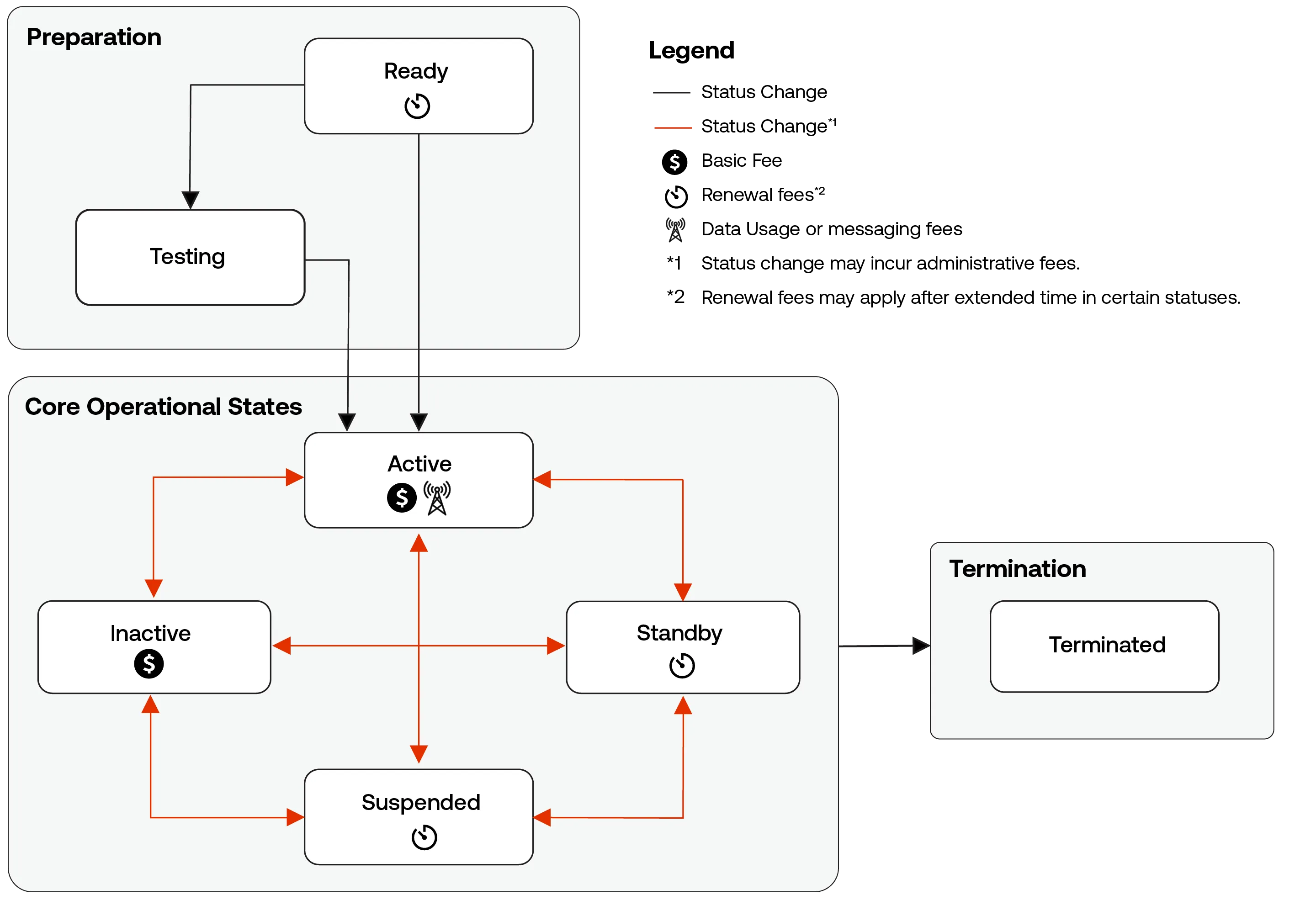
Certain fees are triggered based on how long a SIM remains in specific statuses or when a disabled SIM is reactivated. These lifecycle-related fees are summarized here to provide a general overview of when renewal fees and reactivation fees may occur.
Actual billing rules depend on the subscription plan. Refer to the [Pricing & Fee Schedule](https://docs.soracom.io/en/pricing) for full details.
### Additional Subscriptions
When additional subscriptions such as planP1, planX1, planX2, planX3, plan-US-max, plan-US-NA, planNT1, planM1, or planV1 are added to a plan01s or plan-US SIM using [Subscription Containers](https://docs.soracom.io/en/services/air/subscription-containers), the primary subscription plan01s or plan-US governs the SIM's subscriber status.
Status changes apply to the SIM as a whole, including all additional subscriptions on the SIM.
## Status Details
### Ready
When you register an IoT SIM to your account, its initial subscription status is set to **Ready**. This status indicates that the registration process was completed successfully and that the SIM is now ready for use.
As soon as a device initiates its first cellular connection request, the subscription status will automatically change to **Testing** if [Test Mode](https://docs.soracom.io/en/services/air/test-mode) had already been enabled for the SIM; otherwise, it will change to **Active**. No (re)activation fee is incurred for this first transition out of **Ready**.
> [!WARNING]
>
> **Ready Status Fees**
>
> - plan01s, plan01s - LDV, planP1, planX3, planX3-EU, and plan-KM1 subscriptions do not incur fees while **Ready**. However, an annual subscription renewal fee applies if the subscription remains in **Ready** status for more than 1 year.
> - plan-US subscriptions do not incur fees during the first 6 months of **Ready** status. However, a monthly subscription renewal fee applies if the subscription remains in **Ready** status for more than 6 months.
> - plan-D, plan-K, and plan-K2 subscriptions incur a reduced daily basic fee while **Ready**.
> - plan-DU subscriptions do not incur fees for the first two months while the subscription is **Ready**. After that, a reduced monthly fee applies as long as the subscription remains **Ready**.
### Testing
When a subscription is set to Testing, it will be exempt from data communication and SMS usage fees within predefined usage and time limits. This status is designed to verify that products using IoT SIMs operate correctly during quality control.
> [!NOTE]
>
> To make use of Testing status, you must apply for it in advance. For details, refer to [Enabling Test Mode](https://docs.soracom.io/en/services/air/test-mode#enabling-test-mode).
### Active
A subscription with an **Active** status indicates that data sessions are allowed. While **Active**, the status will also indicate whether the SIM is currently Online or Offline.
The Online and Offline statuses only refer to whether the subscription currently has an active data session.
- When a device successfully attaches to a network _and_ creates a data session, the subscription status will appear as Online.
- In some cases, a device may be configured to create a data session _manually_, or it may have encountered an error when creating a data session. As the subscription does not have an active data session, it will appear as Offline even if the device is powered on.
- Similarly, if a subscription currently appears Online and the device is abruptly disconnected from the network (for example, because its battery was removed or power input was disconnected), the device will not have a chance to notify the network of ending the data session. As a result, the subscription may continue to appear Online for up to four hours after the device has been powered off.
> [!WARNING]
>
> **Active Status Fees**
>
> - plan01s, planP1, plan-D, and plan-K subscriptions incur a daily basic fee while **Active**, as well as fees for data used.
> - plan01s - LDV and plan-KM1 subscriptions incur a monthly basic fee while **Active**, as well as fees for data used.
> - plan-US, planX3, planX3-EU, plan-DU, and plan-K2 subscriptions incur a monthly basic fee while **Active**, which includes a data usage allowance in the monthly fee.
### Inactive
When a subscription is set to **Inactive**, data sessions are blocked. This status can be used to temporarily prevent a device from consuming any data when network connectivity is not required. As a result, no data usage fees are incurred in this status.
Although data sessions are blocked, your device may continually attempt to reconnect, which could result in excessive power consumption. An appropriate reconnection process is recommended, such as exponentially increasing the duration between reconnection attempts, or implementing a reconnection timeout after a set number of attempts.
> [!WARNING]
>
> **Inactive Status Fees**
>
> - plan01s, planP1, plan-D, and plan-K subscriptions continue to incur the same daily basic fee while **Inactive**.
> - plan01s - LDV, plan-US, planX3, planX3-EU, plan-DU, plan-K2, and plan-KM1 subscriptions continue to incur the same monthly basic fee while **Inactive**.
### Standby
When a subscription is set to **Standby**, it will behave similarly to the original **Ready** status, where no basic fees or data usage fees are incurred. As soon as a device initiates a cellular connection request, the subscription status will automatically change to **Active** again.
This status can be used to control subscription costs when your SIMs will not be used for an undetermined amount of time, and where you want the subscription to automatically reactivate when the device is turned on again.
Unlike the **Ready** status, a reactivation fee applies when the subscription status changes from **Standby** to **Active** or **Inactive**.
> [!NOTE]
>
> Before changing a subscription status to **Standby**, ensure that your device is fully powered off in order to prevent accidental reactivation.
> [!WARNING]
>
> **Standby Status Fees**
>
> - plan01s and planP1 subscriptions do not incur daily basic fees while in **Standby**. There is no fee to set the subscription status to **Standby**, however a reactivation fee is incurred when the subscription is reactivated. In addition, an annual subscription renewal fee applies if the subscription remains in **Standby** status for more than 1 year.
> - plan01s - LDV, planX3, and plan-KM1 subscriptions do not incur monthly basic fees while in **Standby** (excluding the month that the subscription status is set to **Standby**). There is no fee to set the subscription status to **Standby**, however a reactivation fee is incurred when the subscription is reactivated. In addition, an annual subscription renewal fee applies if the subscription remains in **Standby** status for more than 1 year.
> - plan-US subscriptions do not incur monthly basic fees while in **Standby** (excluding the month that the subscription status is set to **Standby**). There is no fee to set the subscription status to **Standby** and no reactivation fee when the subscription is reactivated. However, a monthly subscription renewal fee applies if the subscription remains in **Standby** status for more than 6 months.
> - planX3-EU subscriptions do not incur monthly basic fees while in **Standby**. There is no fee to set the subscription status to **Standby** and no reactivation fee when the subscription is reactivated. However, an annual subscription renewal fee applies if the subscription remains in **Standby** status for more than 1 year.
> - plan-D, plan-DU, plan-K, and plan-K2 subscriptions do not support **Standby** status.
### Suspended
When a subscription is set to **Suspended**, data sessions are blocked, and the SIM does not incur daily or monthly basic fees. This status can be used to prevent a device from consuming any data and to control subscription costs when network connectivity is not required for an extended amount of time.
Although data sessions are blocked, your device may continually attempt to reconnect, which could result in excessive power consumption. An appropriate reconnection process is recommended, such as exponentially increasing the duration between reconnection attempts, or implementing a reconnection timeout after a set number of attempts.
Unlike the **Standby** status, all data sessions will be blocked, and the subscription must be manually reactivated before a device using the SIM can connect to a network again.
> [!NOTE]
>
> If a device repeatedly attempts to reconnect while the SIM is **Suspended**, it generates repeated signaling to the cellular base station, which can tie up network resources and prevent other devices, including non-Soracom devices, from connecting. If this behavior continues, Soracom may reactivate the SIM without notice, and normal fees associated with an Active SIM will apply. To prevent this, power off the device or confirm that it is not configured to continue reconnecting after the network rejects the connection.
> [!NOTE]
>
> If a device attempts to connect to a network while a subscription is **Suspended**, Soracom will send a signal to the device informing that the connection is _permanently_ rejected, which will cause the device to stop attempting to reconnect. After manually reactivating a **Suspended** subscription, the device must also be manually rebooted or power-cycled in order to resume network connections. Before changing a subscription to **Suspended** status, ensure that you will be able to access the device in order to reboot it when reactivating the subscription.
Similar to the **Standby** status, a reactivation fee applies when the subscription status changes from **Suspended** to **Active** or **Inactive**.
> [!WARNING]
>
> **Suspended Status Fees**
>
> - plan01s and planP1 subscriptions do not incur daily basic fees while **Suspended**. There is no fee to set the subscription status to **Suspended**, however a reactivation fee is incurred when the subscription is reactivated. In addition, an annual subscription renewal fee applies if the subscription remains in **Suspended** status for more than 1 year.
> - plan01s - LDV, planX3, and plan-KM1 subscriptions do not incur monthly basic fees while **Suspended** (excluding the month that the subscription status is set to **Suspended**). There is no fee to set the subscription status to **Suspended**, however a reactivation fee is incurred when the subscription is reactivated. In addition, an annual subscription renewal fee applies if the subscription remains in **Suspended** status for more than 1 year.
> - plan-US subscriptions do not incur monthly basic fees while **Suspended** (excluding the month that the subscription status is set to **Suspended**). There is no fee to set the subscription status to **Suspended** and no reactivation fee when the subscription is reactivated. However, a monthly subscription renewal fee applies if the subscription remains in **Suspended** status for more than 6 months.
> - planX3-EU subscriptions do not incur monthly basic fees while **Suspended**. There is no fee to set the subscription status to **Suspended** and no reactivation fee when the subscription is reactivated. However, an annual subscription renewal fee applies if the subscription remains in **Suspended** status for more than 1 year.
> - plan-K subscriptions incur a reduced daily basic fee while **Suspended**. A suspension fee is incurred when the subscription status is changed from **Active** or **Inactive** to **Suspended**.
> - plan-D and plan-K2 subscriptions incur a reduced monthly basic fee while **Suspended**.
> - plan-DU subscriptions continue to incur the same monthly basic fee while **Suspended**.
### Terminated
If you no longer need your Soracom IoT SIM, you can terminate its subscription by changing its status to **Terminated**. There are no fees to terminate a subscription, and once terminated, all service will stop and no further basic fees or data usage fees are incurred.
Changing a subscription status to **Terminated** is a permanent and irreversible action. **Terminated** SIMs will no longer be able to establish cellular connections. If you need to re-enable a SIM that has been terminated, you must purchase a new SIM, register it to your account, and replace the terminated SIM card in your device with the new SIM.
Terminated SIMs will remain visible in your account for a certain duration, and will eventually be automatically removed from your account.
> [!NOTE]
>
> Terminating a subscription does not necessarily stop the device using the SIM from attempting to connect to the cellular network. If a device repeatedly attempts to reconnect after its SIM is **Terminated**, it generates repeated signaling to the cellular base station, which can tie up network resources and prevent other devices, including non-Soracom devices, from connecting. If this behavior continues, Soracom may contact you and ask you to power off the device. To prevent this, power off the device before terminating the subscription, or confirm that it is not configured to continue reconnecting after the network rejects the connection. For more information, refer to the [Termination](https://docs.soracom.io/en/services/air/termination) documentation.
> [!WARNING]
>
> **Terminated Status Fees**
>
> - There are no fees for terminating a subscription.
## Viewing Status Update History
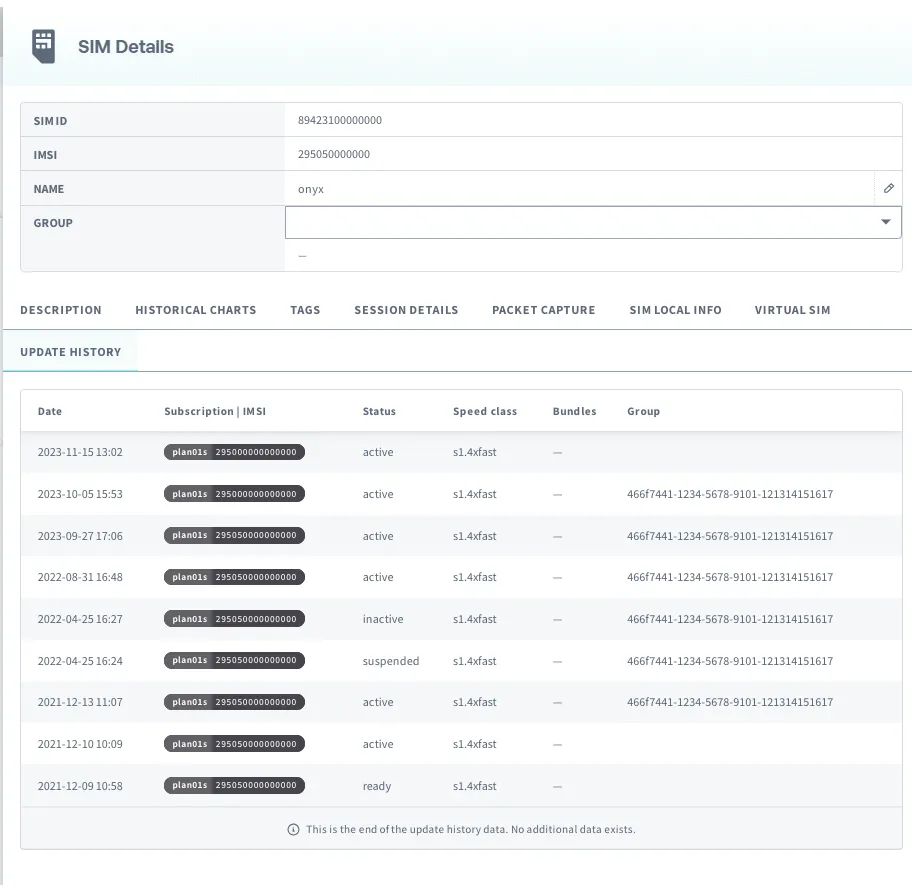
You can view the history of changes to a SIM's status.
The following actions are recorded as part of a SIM's status history:
- [Registering a SIM](https://docs.soracom.io/en/services/air/registration)
- [Changing a SIM's Status](https://docs.soracom.io/en/services/air/subscriber-status#changing-a-subscription-status)
- [Changing a SIM's Speed Class](https://docs.soracom.io/en/services/air/speed-class#changing-a-speed-class)
- [Changing a SIM's Data Bundle](https://docs.soracom.io/en/services/air/data-usage#changing-bundled-data-plans)
- [Adding a SIM to a Group](https://docs.soracom.io/en/services/groups/usage#adding-a-device-to-a-group) or [Removing a SIM from a Group](https://docs.soracom.io/en/services/groups/usage#removing-a-device-from-a-group)
- [Adding a Subscription Container to a SIM](https://docs.soracom.io/en/services/air/subscription-containers#adding-a-subscription)
To view the SIM update history:
1. Sign in to the **[User Console](https://console.soracom.io/?coverage_type=g)**. From the **☰ Menu**, open the **SIM Management** screen.
2. From the list of subscribers, click the **☑** for the SIM you want to view, then click the **Details** button.
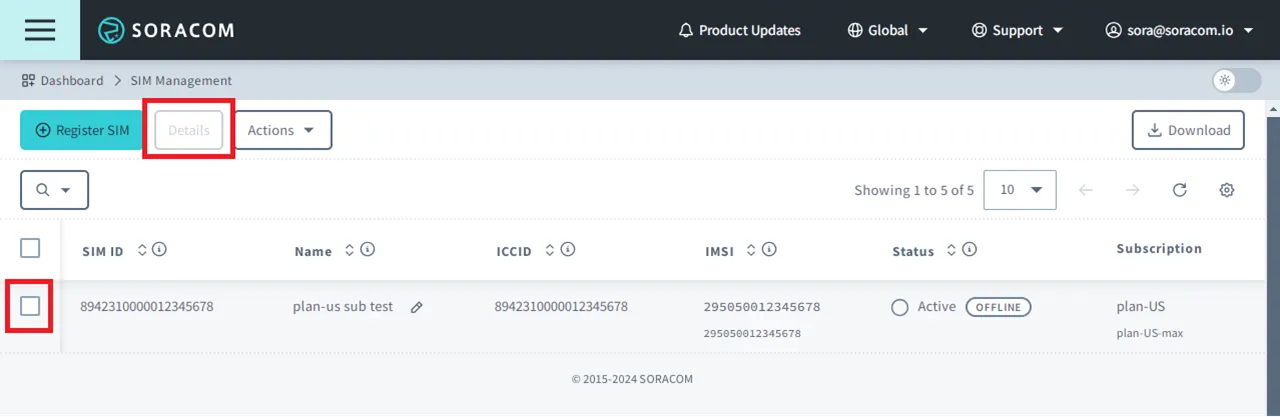
3. Select **Update history** to view all changes that have been recorded for your SIM.
> [!WARNING]
>
> Note that SIM status update history does not contain information about the following:
>
> - The source of the SIM status change. For example, whether a SAM User or Event Handler made the change
> - Session history or data usage history. Instead, use the **Session details** and **Historical charts** tabs, respectively
> - Details of what group settings were changed
## Changing a Subscription Status
> [!NOTE]
>
> For security reasons, Soracom support agents cannot change SIM statuses on behalf of customers.
To change the status of a subscription:
1. Sign in to the **[User Console](https://console.soracom.io/?coverage_type=g)**. From the **☰ Menu**, open the **SIM Management** screen.
2. From the list of subscribers, click the **☑** for the SIM you want to manage.
3. Click the **Actions ▾** menu, then select one of the following:
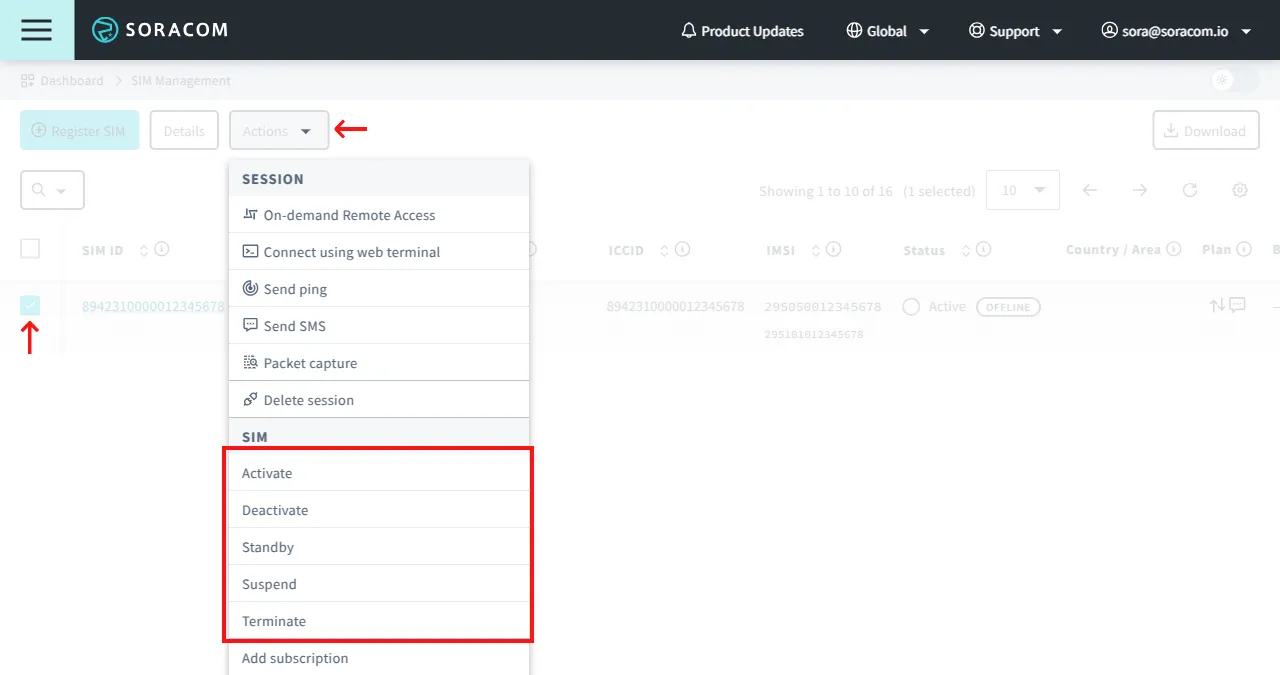
- To set its status to Active, select **Activate**.
- To set its status to Inactive, select **Deactivate**.
- To set its status to Standby, select **Standby**.
- To set its status to Suspended, select **Suspend**.
- To set its status to Terminated, select **Terminate**.
> [!NOTE]
>
> Changing a subscription status to **Terminated** is a permanent and irreversible action. For more information, refer to the [Termination](https://docs.soracom.io/en/services/air/termination) documentation.
## Tracking Renewal Fee
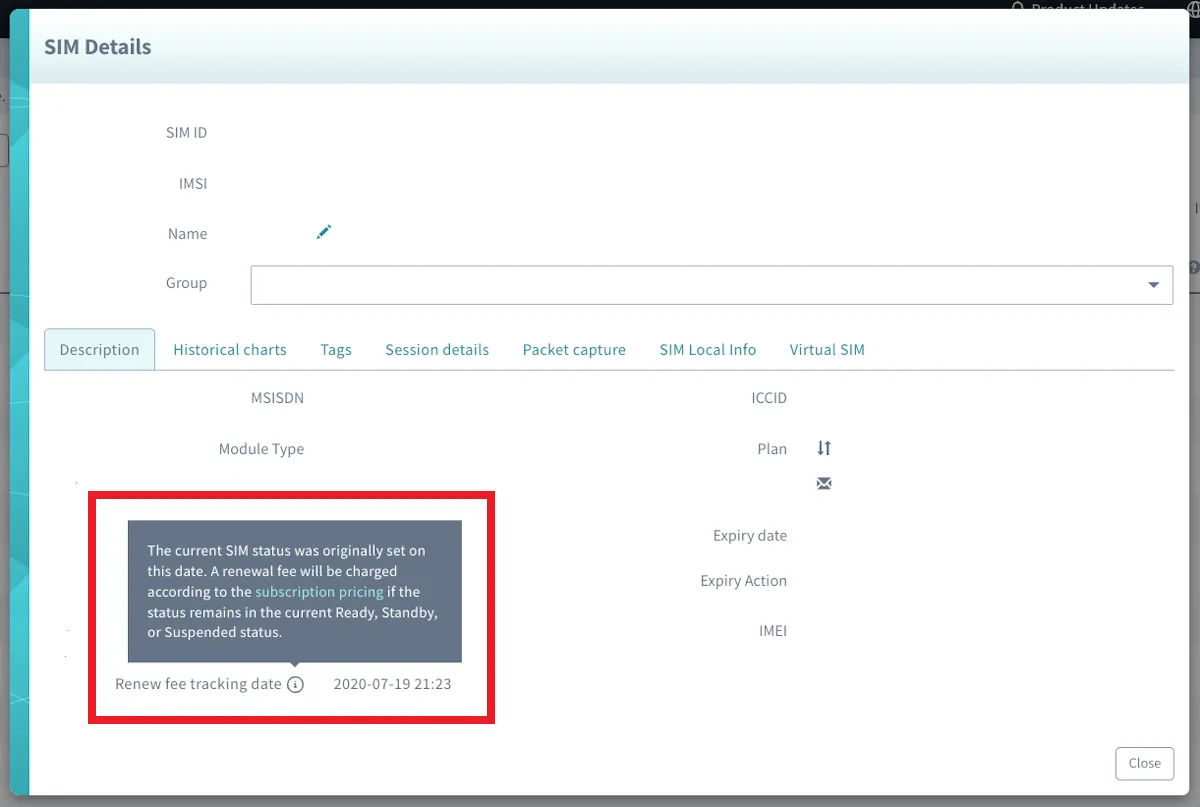
Soracom IoT SIMs have an associated annual renewal fee for when the SIM was registered in a **Ready** state or when the status was set to **Standby** or **Suspended** for more than one year. Within the **Description** tab of the SIM Details, users can view the Renewal Fee tracking date for each SIM.
1. Sign in to the **[User Console](https://console.soracom.io/?coverage_type=g)**. From the **☰ Menu**, open the **SIM Management** screen.
2. From the list of subscribers, click the **☑** for the SIM you want to view, then click the **Details** button.

3. Within the **Description** tab, find the Renewal Fee Tracking date.
## Programmatic Usage
You can programmatically check the status of an IoT SIM using the Soracom API, CLI, or IoT SIM Metadata Service.
When using the API or CLI, you will need the SIM ID of the IoT SIM. Alternatively, you can use the IMSI for subscriber-based API operations.
### Soracom API
To access the Soracom API, first use the [**auth**](https://docs.soracom.io/en/api#!/Auth/auth) API to obtain an API Key and Token. Refer to the [**API Usage Guide**](https://docs.soracom.io/en/developers/soracom-api) for instructions on how to use the API Key and Token in API requests.
You can use the [getSim](https://docs.soracom.io/en/api#!/Sim/getSim) API to get the subscription and session status of an IoT SIM:
**Global**
```bash
curl -X GET \
-H 'X-Soracom-API-Key: ' \
-H 'X-Soracom-Token: ' \
https://g.api.soracom.io/v1/sims/
```
**Japan**
```bash
curl -X GET \
-H 'X-Soracom-API-Key: ' \
-H 'X-Soracom-Token: ' \
https://jp.api.soracom.io/v1/sims/
```
The API will return a JSON response similar to the following:
```json
{
"imsi": "295050012345678",
"msisdn": "423012345678",
"ipAddress": "10.123.45.67",
"operatorId": "OP0012345678",
"apn": "soracom.io",
"type": "s1.standard",
"groupId": "abcdef00-0000-0000-0000-000012345678",
"status": "active",
"tags": {
"name": "my-sim"
},
"sessionStatus": {
"imei": "860000012345678",
"cell": {
"radioType": "lte",
"mcc": 310,
"mnc": 410,
"lac": 42973,
"sac": 14702,
"rac": 255
},
"ueIpAddress": "10.123.45.67",
"dnsServers": [
"100.127.0.53",
"100.127.1.53"
],
"online": true
},
"speedClass": "s1.standard",
"moduleType": "trio",
"plan": 1,
"iccid": "8942310000012345678",
"subscription": "plan01s"
}
```
The `status` property will indicate the current subscription status of the IoT SIM, while the `sessionStatus.online` property will indicate whether or not the SIM is currently connected.
To change the status of a SIM on a per-SIM basis, use one of the following APIs:
- [activateSim](https://docs.soracom.io/en/api#!/Sim/activateSim)
- [deactivateSim](https://docs.soracom.io/en/api#!/Sim/deactivateSim)
- [setSimToStandby](https://docs.soracom.io/en/api#!/Sim/setSimToStandby)
- [suspendSim](https://docs.soracom.io/en/api#!/Sim/suspendSim)
- [terminateSim](https://docs.soracom.io/en/api#!/Sim/terminateSim)
Alternatively, you can use the following APIs to perform the same actions on a per-subscriber basis:
- [activateSubscriber](https://docs.soracom.io/en/api#!/Subscriber/activateSubscriber)
- [deactivateSubscriber](https://docs.soracom.io/en/api#!/Subscriber/deactivateSubscriber)
- [setSubscriberToStandby](https://docs.soracom.io/en/api#!/Subscriber/setSubscriberToStandby)
- [suspendSubscriber](https://docs.soracom.io/en/api#!/Subscriber/suspendSubscriber)
- [terminateSubscriber](https://docs.soracom.io/en/api#!/Subscriber/terminateSubscriber)
> [!WARNING]
>
> The `/sims/` level APIs will provide the same functionality as the `/subscribers/` level APIs, with forward compatibility for SIMs which contain more than one [Subscription Container](https://docs.soracom.io/en/services/air/subscription-containers).
You can use the following API to retrieve the SIM status history:
- [listSimStatusHistory](https://docs.soracom.io/en/api#!/Sim/listSimStatusHistory)
To delete an ongoing session or list session history programmatically, see the [Session Status](https://docs.soracom.io/en/services/air/session-status#programmatic-usage) documentation.
### Soracom CLI
To use the Soracom CLI, you must first configure it to authenticate with your account information, authorization key, or SAM user credentials.
Run the following command to get the subscription and session status of an IoT SIM:
**Global**
```bash
soracom sims get --sim-id --coverage-type g
```
**Japan**
```bash
soracom sims get --sim-id --coverage-type jp
```
The CLI will return a response similar to the API example above.
To change the status of a SIM on a per-SIM basis, use one of the following CLI commands:
- `soracom sims activate`
- `soracom sims deactivate`
- `soracom sims set-to-standby`
- `soracom sims suspend`
- `soracom sims terminate`
Alternatively, you can use the following commands on a per-subscriber basis using an IMSI:
- `soracom subscribers activate`
- `soracom subscribers deactivate`
- `soracom subscribers set-to-standby`
- `soracom subscribers suspend`
- `soracom subscribers terminate`
To delete an ongoing session or list session history programmatically, see the [Session Status](https://docs.soracom.io/en/services/air/session-status#programmatic-usage) documentation.
### Metadata Service
The Metadata Service allows an Air SIM device to access and configure its own settings without the need for authentication. For more information, refer to the [**Metadata Service**](https://docs.soracom.io/en/services/air/metadata-service) documentation.
With the Metadata Service option enabled, simply access the following API:
```bash
curl http://metadata.soracom.io/v1/subscriber
```
The Metadata Service will return a JSON response similar to the API example above.
To change the status of a subscriber, the Metadata Service **Readonly** option must be disabled. Then, use the same endpoints that correspond to the Soracom **Subscriber** API.
> [!NOTE]
>
> When calling the **deactivateSubscriber** or **suspendSubscriber** APIs, the ongoing session will be deleted and your device will not be allowed to reconnect. You will be required to reactivate the subscription using the User Console, Soracom API, or Soracom CLI, in order for your device to reconnect.
>
> Similarly, when calling the **terminateSubscriber** API, the subscription will be terminated and the device will no longer be able to connect.
To delete an ongoing session or list session history programmatically, see the [Session Status](https://docs.soracom.io/en/services/air/session-status#programmatic-usage) documentation.