# Firmware Updates
Receive firmware updates and add capabilities to the Soracom LTE-M Button.
The Soracom LTE-M Button includes firmware over-the-air (FOTA) capabilities that allow it to add new features and receive security updates from Soracom without the need to connect to a computer and install firmware manually.
The FOTA capability is especially useful for large-scale or remote deployments where retrieving buttons is time-consuming and disruptive.
## Firmware Versions
| Version | Release | Details |
| - | - | - |
| 2220 | Initial version | The original firmware of the Soracom LTE-M Button, providing most of the core functionality of the button. |
| 3134 | June 2024 | - New [Alert](https://docs.soracom.io/en/devices/soracom-lte-m-button/operation-modes/alert) and [Alert + Heartbeat](https://docs.soracom.io/en/devices/soracom-lte-m-button/operation-modes/alert-and-heartbeat) operation modes added.
- New option to automatically send a [Status message](https://docs.soracom.io/en/devices/soracom-lte-m-button/message-examples#status-message) once every 24 hours to report the button's current state and support configuration updates. This Status message is also used in firmware update workflows.
- Battery voltage now included in all messages.
- LED blink patterns now mimic the type of detected click: single short blink, double short blink, and single long blink corresponding to each type of click.
- When the operation mode is configured as [Timer](https://docs.soracom.io/en/devices/soracom-lte-m-button/operation-modes/timer), the LED now blinks to provide immediate feedback that the click was successfully recorded.
- Fixed a bug that caused `Falling edge` and `Rising edge` [Edge Detection](https://docs.soracom.io/en/devices/soracom-lte-m-button/io-modes/edge-detection) events to be decoded in reverse.
- Fixed a bug that caused the button to send a TCP packet to Soracom approximately once a week, which would result in a "configuration not found" error. |
## Checking the Firmware
You can find the firmware version of a button from the Soracom LTE-M Button screen in the **Firmware Version** column:
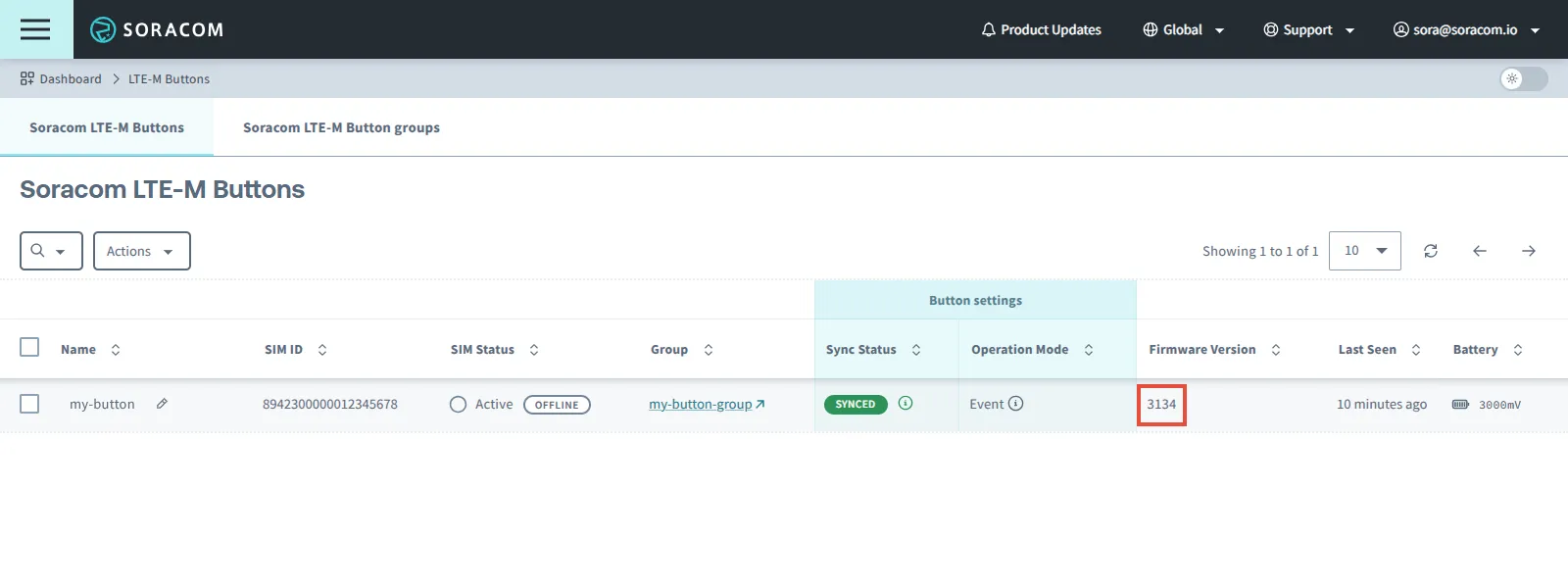
The firmware version is also reported directly by the button in the [Status message](https://docs.soracom.io/en/devices/soracom-lte-m-button/message-examples#status-message).
> [!WARNING]
>
> If the **Firmware Version** column for your button is empty, press and hold your Soracom LTE-M Button's built-in button for 10 seconds to sync the button.
>
> Once your button's LED blinks one extra long green blink ☀────────, click the **↻** button in the list of Soracom LTE-M Buttons and check the **Firmware Version** column again.
## Updating the Firmware
To protect your devices, FOTA is disabled by default so that buttons cannot install unverified firmware updates.
Before requesting a firmware update, check the firmware version currently installed on your button.
If your button does not have the latest firmware, [contact Soracom Support](https://docs.soracom.io/en/services/account/support#creating-a-support-request) with the SIM ID(s) of your button(s). Soracom Support will enable FOTA for the specified buttons and provide instructions for performing the update.